

Intranet UX Best Practices: Optimizing Your Digital Workspace

Originally Posted: October 29, 2024
Last Updated: April 9, 2026
Intranets have come a long way from being simple document repositories. Today’s platforms connect systems, support workflows, and serve as a central hub for communication and collaboration.
Despite these advancements, though, many intranets still fall short. Employees struggle to find information, complete tasks efficiently, or stay engaged with the platform, and more often than not, that gap comes down to user experience (UX).
The real value of an intranet shows up in how easily employees can get things done. If it helps them find information quickly and complete tasks without friction, it becomes part of their daily workflow. If it doesn’t, it gets ignored.
As we explore intranet UX best practices, the goal is straightforward: create a digital workplace that employees actually want to use. When UX is done well, the intranet becomes a natural part of how work gets done, not something employees avoid.
Tailoring the Intranet Experience to Users
One of the most important intranet UX best practices is designing with your users in mind. An intranet that reflects how employees actually work will always outperform one that’s built around assumptions or internal structures.
User Research and Personas
Before making design decisions, it’s critical to understand your users. Different roles interact with the intranet in different ways, and those differences should shape how the experience is built.
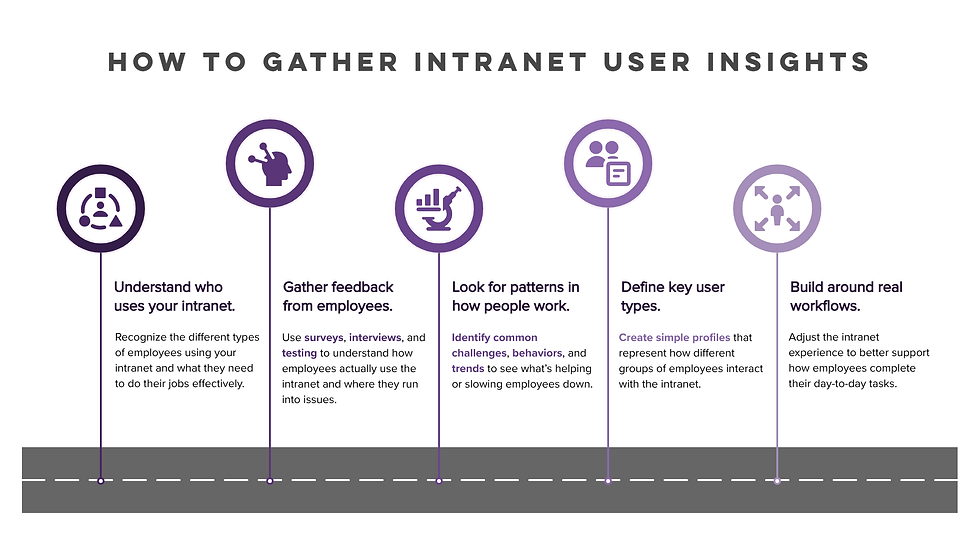
A strong approach combines both data and real user feedback, such as:
Surveys to identify patterns in user behavior
Interviews to uncover challenges and expectations
Usability testing to observe real interactions
Analytics to understand what content is actually being used
From there, user personas help translate those findings into something actionable. For example, a frontline employee may prioritize quick access to schedules and announcements, while a manager may need dashboards, reporting tools, and team resources. Designing around these real-world use cases ensures your intranet supports the needs of your entire workforce, not just a subset of users.
Accessibility and Availability
Accessibility in the context of intranet UX isn’t just about compliance. It’s about making sure employees can access the tools and information they need, wherever and however they’re working.
Today’s workforce isn’t tied to a single location or device. Employees may be in the office one day, working remotely the next, or accessing information on the go. Your intranet needs to support that flexibility.
This means designing an experience that works consistently across environments, including:
Mobile devices for employees who aren’t at a desk
Laptops and desktops for more in-depth tasks
Remote access without friction or additional barriers
Just as importantly, the intranet should load quickly, remain easy to navigate on smaller screens, and maintain a consistent experience regardless of how it’s accessed.
When accessibility is approached this way, it becomes less about checking boxes and more about removing obstacles. The goal is simple: ensure employees can rely on the intranet whenever they need it, without having to think twice about how to access it.
Customizable Workflows
No two employees work in exactly the same way, which is why flexibility matters. Allowing users to personalize their intranet experience can make a noticeable difference in how often and how effectively they use it.
In practice, this might include:
Configurable dashboards with frequently used tools and resources
Personalized notifications and updates
Even small adjustments like these can reduce friction and help users move more efficiently through their daily tasks. When employees can set things up in a way that matches how they work, they’re more likely to rely on the intranet day to day.
Streamlining Navigation and Content
Even the most robust intranet won’t deliver value if employees can’t find what they need. Navigation and content structure play a central role in shaping the overall user experience.

Task-Oriented Navigation
One of the most effective ways to improve usability is to organize parts of the intranet around common tasks, not just internal departments. While most systems still rely on some level of departmental structure, adding task-based entry points can make the experience far more intuitive.
Employees don’t typically think in terms of organizational charts. They think in terms of what they need to get done. For example, instead of navigating through HR or Finance sections, users may be trying to:
Submit an expense report
Request time off
Find a policy or form
Start a new project or access project resources
This doesn’t require a complete redesign of your intranet structure. Instead, it’s about reducing friction, making it easier for employees to complete common actions without needing to understand how your organization is structured behind the scenes.
When done well, task-oriented navigation helps users move faster and feel more confident using the platform.
Content Relevance
Content can quickly become a liability if it isn’t maintained. Outdated pages, duplicate information, and inconsistent structure all contribute to a poor user experience.
Keeping content relevant requires more than occasional updates. It involves assigning ownership, regularly reviewing what’s published, and making sure information stays aligned with current business needs.
Without that level of oversight, even a well-designed intranet can become cluttered over time. Once employees start second-guessing what they find, they’ll look elsewhere for answers and often won’t come back.
Search Optimization
Search is often the fastest way for employees to find what they need, which makes it one of the most important components of intranet UX.
A strong search experience goes beyond basic keyword matching. It should account for how users phrase queries, surface relevant results quickly, and make it easy to refine those results when needed.
Features that support this include:
Tagging and metadata for better accuracy
Filters to narrow results quickly
Auto-suggestions to guide searches
More advanced capabilities, such as personalized results or machine learning-driven relevance, can take this even further. When search works well, it significantly reduces the time employees spend looking for information and helps reinforce trust in the platform.
Modern Intranet UX Expectations
The way employees use technology at work has changed, and their expectations have changed with it. Today’s users expect the same level of speed, personalization, and ease of use from their intranet as they do from the apps they use every day.
Modern intranet UX best practices now extend beyond structure and navigation. They include personalized experiences based on role or behavior, intelligent search that surfaces relevant content quickly, and seamless access across devices.
Integration also plays a key role. When the intranet connects naturally with tools like Microsoft Teams, it becomes part of the workflow rather than a separate destination.
Without these elements, even a well-organized intranet can feel outdated and underutilized.
Not sure where to start?
Improving intranet UX doesn’t have to happen all at once. Identifying a few high-impact changes can make a noticeable difference right away.
Enhancing Employee Engagement with Interactive Features
To remain effective, an intranet needs to do more than present information—it needs to give employees a reason to come back and interact with the platform.
Social features can help create a sense of connection across the organization, especially for remote or distributed teams. Discussion spaces, comment functionality, and user-generated content give employees a way to share knowledge and engage with one another beyond formal communication channels.
Some organizations also explore gamification as a way to increase engagement. While it’s not necessary for every intranet, elements like recognition or participation incentives can encourage more consistent interaction.
At the same time, collaboration tools have become a core expectation. When employees can edit documents, communicate, and manage projects directly within the intranet environment, it reduces the need to switch between systems and helps streamline daily work.
Intranet UX Best Practices Checklist
If you’re evaluating your intranet, a few simple questions can quickly reveal where improvements are needed:
Can employees find what they need in just a few clicks?
Is content organized around tasks rather than departments?
Does the intranet work seamlessly across devices?
Are search results accurate and helpful?
Is there a clear process for keeping content up to date?
If the answer to any of these is no, there’s likely an opportunity to improve the overall experience.
Ongoing UX Monitoring and Iteration
Intranet UX isn’t something that’s ever truly finished. As your organization evolves, your intranet should evolve with it.
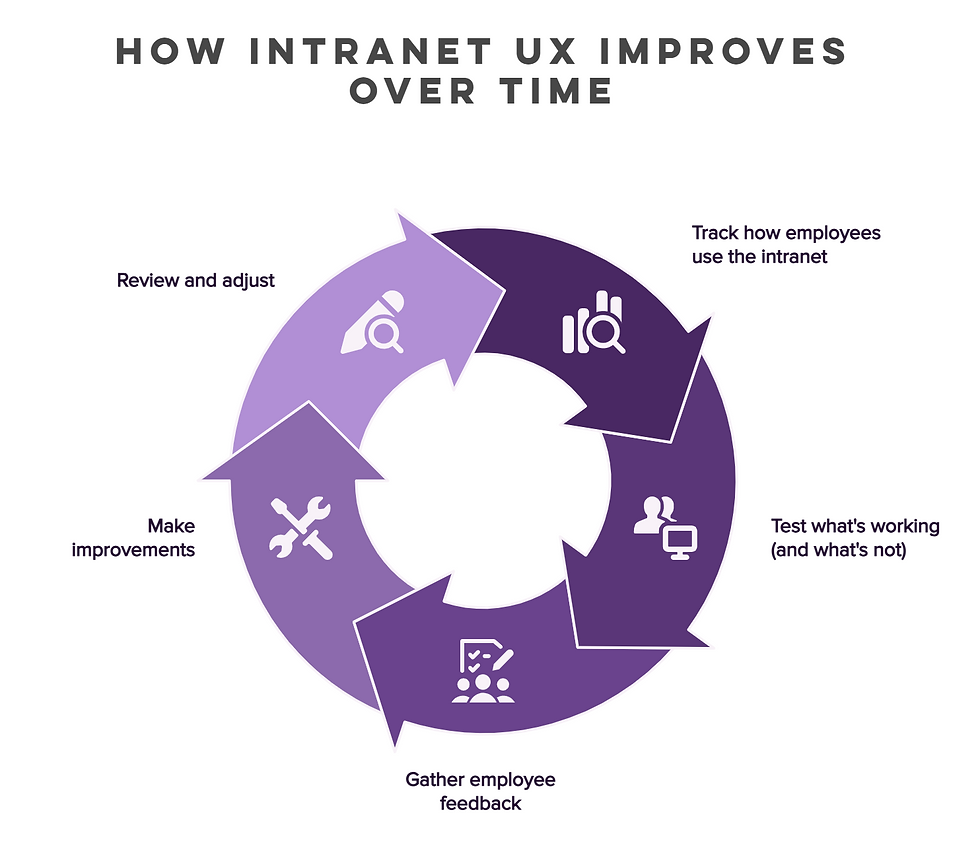
Understanding how employees interact with the platform is a key part of this process. Analytics can reveal which pages are most useful, how users navigate the site, and where they may be encountering friction. These insights provide a foundation for continuous improvement.
Usability testing adds another layer of visibility by showing how real users experience the intranet in practice. Even small adjustments, when guided by feedback, can have a meaningful impact.
Taking an iterative approach—making improvements over time rather than all at once—helps ensure the intranet stays aligned with both user expectations and business needs.
Get the Most Out of Your Intranet Platform
Improving intranet UX isn’t about a one-time redesign: it’s about making sure the platform continues to support how your team actually works. When done well, it creates a digital workspace that supports productivity, improves communication, and helps employees stay connected.
As expectations continue to shift, organizations need to revisit and refine their approach. Advances in artificial intelligence, personalization, and remote work have changed what employees expect from their tools, and intranets are no exception.
By focusing on intranet UX best practices, you can build a platform employees actually use without being told to—one that actively supports how work gets done across your organization.
Transform Your Intranet Experience with Synergy
If your intranet isn’t delivering the experience your team needs, it may be time to rethink your approach.
At Synergy, we design intranet solutions that prioritize usability, engagement, and long-term value. From strategy to implementation, we help organizations build digital workplaces that truly support how their teams work.


Comments