

Signs Your Business Needs Workflow Automation


If getting work done in your organization feels more complicated than it used to, there’s usually a reason.
Processes that once ran smoothly begin to slow down, requiring more communication, more oversight, and more effort to keep things moving.
At first, these changes are easy to overlook. Teams adjust, fill in the gaps, and find ways to keep work progressing. But over time, those small inefficiencies start to add up, impacting productivity, timelines, and the overall consistency of your output.
If this reflects how your business is operating, it might be time to consider introducing workflow automation. It’s not about replacing your team – it’s about removing friction from the way work gets done.
What Workflow Automation Actually Solves
At its core, workflow automation introduces structure into processes that would otherwise rely on manual coordination.
Instead of work being passed along through emails, messages, or memory, it follows a defined path. Tasks move forward based on rules rather than reminders, and approvals happen in a consistent, trackable way.
In practice, this leads to:
More predictable outcomes
Fewer delays between steps
Clear visibility into where work stands
Rather than constantly checking in or following up, teams can rely on the process itself to keep work moving.
Where Process Friction Starts to Show
Inefficiencies in your business processes rarely appear all at once. More often than not, they show up as small points of friction that gradually become part of the daily routine.
You might notice work becoming harder to track, or that teams rely more on follow-ups just to keep things moving. What used to be a straightforward process starts requiring extra communication and extra effort.
Individually, these moments don’t seem significant. Together, though, they signal that your existing processes may not be keeping pace with how your business operates.
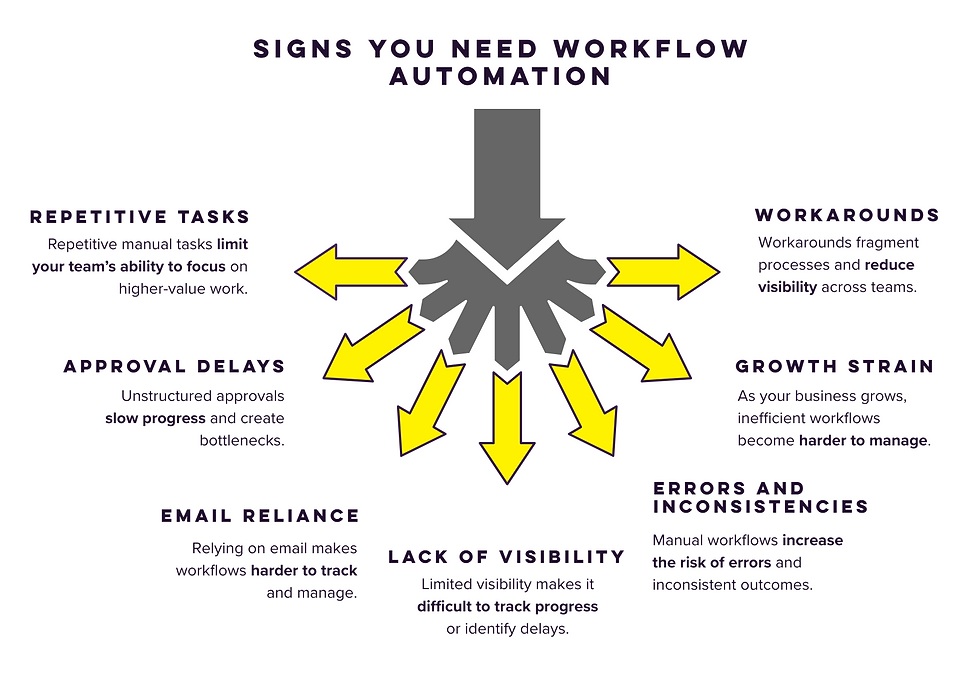
7 Signs Your Business Needs Workflow Automation
1. Repetitive Tasks Are Taking Up Too Much Time
When a large portion of your team’s day is spent on manual, repeatable work, it limits their ability to focus on higher-value initiatives.
This often shows up in ways that feel small at first, but add up quickly: whether your team is re-entering the same data across multiple systems, manually routing requests or information to colleagues, or handling routine administrative tasks every day, this kind of work tends to slow productivity and keeps teams from operating at a higher level.
👉 This is often one of the easiest areas to improve, since repetitive tasks tend to follow predictable patterns that can be streamlined or automated.
2. Work Gets Delayed Waiting for Approvals
Approvals are a natural part of many workflows, but without structure, they often become a source of delay.
Requests can sit in inboxes, ownership isn’t always clear, and progress depends on someone remembering to follow up. Even small delays at this stage can create ripple effects across an entire process.
👉 Introducing a more structured approval flow can help remove delays without adding complexity.
3. Email Has Become Your Primary Workflow Tool
Email is effective for communication, but it wasn’t designed to manage structured processes.
When workflows rely heavily on email, it becomes difficult to maintain consistency or visibility. You may start to notice:
Requests getting buried or missed
Incomplete or unclear information
No reliable record of how work progressed
What begins as a convenient solution often turns into a source of inefficiency.
👉 Moving these processes into a centralized system can make them easier to track and manage.
4. It’s Hard to See Where Work Stands
A lack of visibility is one of the most common signs of workflow friction.
If your team frequently needs to ask for updates, it usually means there’s no centralized system to track progress. Without that visibility, it becomes harder to identify delays, measure performance, or improve processes over time.
👉 Creating a centralized way to track progress can make it easier to identify issues before they slow things down.
5. Errors and Inconsistencies Are Increasing
Manual processes tend to vary depending on who is completing them.
Different approaches to the same task can lead to inconsistent results, missed steps, and small errors that accumulate over time. This is especially impactful in workflows that are repeated frequently or involve multiple handoffs.
👉 Standardizing how tasks are completed can help reduce variation and improve overall consistency.
6. Growth Is Creating More Work, Not More Efficiency
As your organization grows, your processes should evolve with it.
If scaling requires adding more people just to keep up with workload, it’s often a sign that workflows aren’t optimized. Instead of supporting growth, your processes begin to create additional strain on your team.
👉 Revisiting how these processes are structured can help ensure they scale more efficiently as your business grows.
7. Teams Are Building Their Own Workarounds
When systems don’t fully support how work gets done, teams find their own ways to fill the gaps.
This often includes:
Tracking tasks in spreadsheets or side tools
Creating informal processes outside official systems
Relying on individual knowledge instead of shared systems
While these workarounds help in the short term, they create long-term challenges around consistency, visibility, and long-term efficiency.
👉 Bringing these processes back into a shared system can help reduce fragmentation and improve visibility across teams.
What Workflow Automation Looks Like in Practice
Workflow automation doesn’t have to be complex to be effective. In most cases, it’s not about introducing entirely new processes: it’s about improving the ones your team is already using.
Think about how work typically moves through your organization today. A request might come in through email, get forwarded to the right person, sit waiting for approval, and then require follow-up before the next step happens. And that’s assuming the correct people are involved to begin with. Each part of that process relies on someone remembering what to do next.
Automation changes that dynamic.
Instead of relying on manual coordination, the process itself becomes responsible for moving work forward. A request is submitted in a consistent way. It’s automatically routed to the appropriate person. Approvals happen in a defined sequence, and each step triggers the next without requiring additional follow-up.
Over time, these small improvements create a more reliable system overall. Work moves more consistently, delays become easier to identify, and the entire process becomes easier to manage at scale.
Starting Small and Building Better Processes
The idea of workflow automation can feel overwhelming, especially when multiple processes need improvement at once.
A more effective approach is to start small. Focus on a single workflow that consistently creates friction: something repetitive, time-consuming, or prone to delays. Mapping how that process currently works makes it easier to identify where improvements can have the greatest impact.
From there, automation can be introduced in a focused way, allowing your team to see immediate benefits without overhauling everything at once.
As these improvements take hold, they begin to shape how your organization operates more broadly. Processes become more consistent, visibility improves, and teams spend less time coordinating work and more time completing it.
Over time, this creates a stronger operational foundation—one that supports growth without adding unnecessary complexity.
Ready to Streamline Your Workflows?
If you’re starting to see signs that your processes aren’t scaling effectively, it may be time to take a closer look at where those processes are creating unnecessary friction.
A thoughtful approach to workflow automation can help identify where improvements will have the greatest impact—and put the right structure in place to support long-term growth.


Comments